> ## Documentation Index
> Fetch the complete documentation index at: https://docs.layarva.com/llms.txt
> Use this file to discover all available pages before exploring further.
# Cloud, Edge, and Offline Delivery
> Choose where a Screen gets its content and understand how each delivery mode behaves when connectivity fails.
## Three exclusive delivery modes
Every Screen uses exactly one source of truth for content delivery. This prevents the Cloud and an Edge from serving different content to the same television at the same time.
| Mode | Content is served by | Internet at the Screen | Pairing code | Best for |
| ------------------- | -------------------------------------- | ----------------------------------------------------------------------------- | ----------------------- | ---------------------------------------------------------------- |
| **Cloud** | Layarva Platform directly | Required for synchronization and normal operation | Required | Connected displays managed centrally. |
| **Edge** | A paired Layarva Edge on the local LAN | The Edge needs periodic Cloud sync; local Screens can continue when WAN fails | Not used for the Screen | Branches with several local Screens or unreliable WAN. |
| **Offline content** | A signed `.lvapkg` imported locally | Not required for playback | Not used | Sites with no permanent connection or physical content delivery. |
 ## Cloud
Cloud is the default mode. The Player pairs with a temporary six-digit code, receives a permanent device identity, requests its Channel content from Layarva, and reports heartbeat and playback state.
Use Cloud when the Player can reliably reach the internet. A Cloud Screen that stops reporting is shown as offline; that is different from a Screen deliberately configured for Offline content.
## Edge
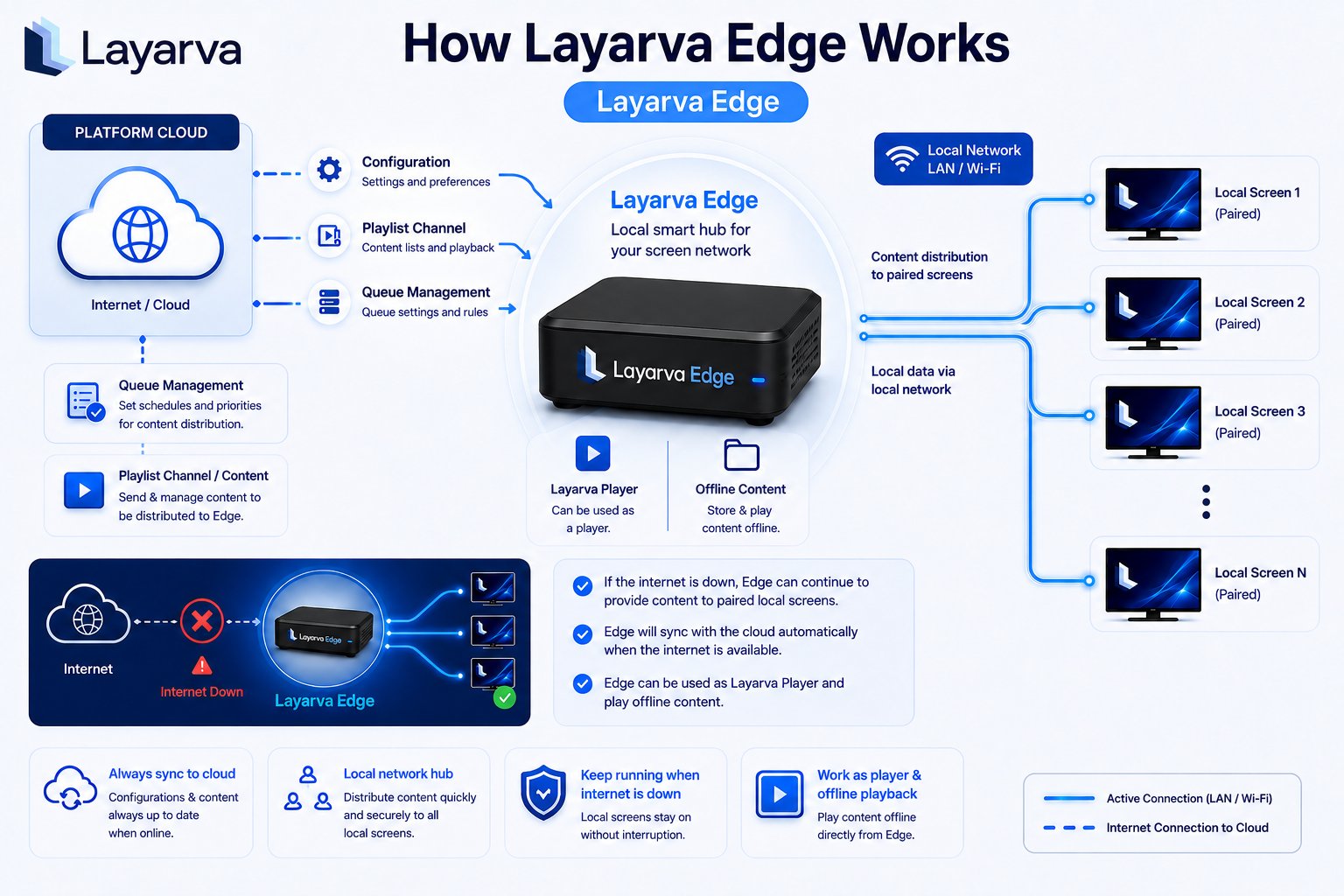
Edge is a local smart hub for a branch network:
1. The Edge pairs and synchronizes configuration, Playlist content, Queue settings, and its local Screen roster from the Platform.
2. Screens assigned to that Edge receive content over LAN or Wi-Fi.
3. If the internet connection fails, previously synchronized local content can continue playing.
4. When internet returns, Edge reconciles with the Platform automatically.
An Edge must be active before a Screen can be assigned to it. Returning a Screen to Cloud revokes the Edge roster entry and requires Cloud pairing again.
## Offline content
Offline content performs no network delivery. Layarva exports a signed package containing an immutable Publication manifest, verified resources, and a playback lease. The package is copied to the Player by flash drive or another physical method.
An Offline Screen is expected to remain **Offline** in monitoring because it does not heartbeat. Use the package expiration shown in the Screen details to determine when content must be exported again.
## What an outage means
| Event | Cloud | Edge | Offline content |
| --------------------------- | -------------------------------------------------------------------------------------- | ------------------------------------------------------ | ------------------------------------------------------ |
| Internet to the site fails | New sync and reporting stop; cached or last-known-good behavior depends on the Player. | Local Screens continue from synchronized Edge content. | No change; playback already uses the imported package. |
| Local LAN fails | Usually unaffected if the Player still has internet. | Edge-served Screens lose their local path. | Unaffected. |
| Content changes in Platform | Player receives the new Publication online. | Edge synchronizes, then serves it locally. | Export and import a new eligible package. |
## Related guides
* [Add a Screen](/screens/add-screen)
* [Pair a Screen](/screens/pairing)
* [Generate Offline Content](/screens/offline-content)
## Cloud
Cloud is the default mode. The Player pairs with a temporary six-digit code, receives a permanent device identity, requests its Channel content from Layarva, and reports heartbeat and playback state.
Use Cloud when the Player can reliably reach the internet. A Cloud Screen that stops reporting is shown as offline; that is different from a Screen deliberately configured for Offline content.
## Edge
Edge is a local smart hub for a branch network:
1. The Edge pairs and synchronizes configuration, Playlist content, Queue settings, and its local Screen roster from the Platform.
2. Screens assigned to that Edge receive content over LAN or Wi-Fi.
3. If the internet connection fails, previously synchronized local content can continue playing.
4. When internet returns, Edge reconciles with the Platform automatically.
An Edge must be active before a Screen can be assigned to it. Returning a Screen to Cloud revokes the Edge roster entry and requires Cloud pairing again.
## Offline content
Offline content performs no network delivery. Layarva exports a signed package containing an immutable Publication manifest, verified resources, and a playback lease. The package is copied to the Player by flash drive or another physical method.
An Offline Screen is expected to remain **Offline** in monitoring because it does not heartbeat. Use the package expiration shown in the Screen details to determine when content must be exported again.
## What an outage means
| Event | Cloud | Edge | Offline content |
| --------------------------- | -------------------------------------------------------------------------------------- | ------------------------------------------------------ | ------------------------------------------------------ |
| Internet to the site fails | New sync and reporting stop; cached or last-known-good behavior depends on the Player. | Local Screens continue from synchronized Edge content. | No change; playback already uses the imported package. |
| Local LAN fails | Usually unaffected if the Player still has internet. | Edge-served Screens lose their local path. | Unaffected. |
| Content changes in Platform | Player receives the new Publication online. | Edge synchronizes, then serves it locally. | Export and import a new eligible package. |
## Related guides
* [Add a Screen](/screens/add-screen)
* [Pair a Screen](/screens/pairing)
* [Generate Offline Content](/screens/offline-content)