> ## Documentation Index
> Fetch the complete documentation index at: https://docs.layarva.com/llms.txt
> Use this file to discover all available pages before exploring further.
# Queue Management Overview
> Understand Queue Units, services, counters, operators, Kiosks, Displays, and the ticket lifecycle.
## What a Queue Unit is
A **Queue Unit** is one isolated queue operation for a branch, floor, or service area. It owns the configuration and runtime records needed to issue, call, serve, and report queue tickets.
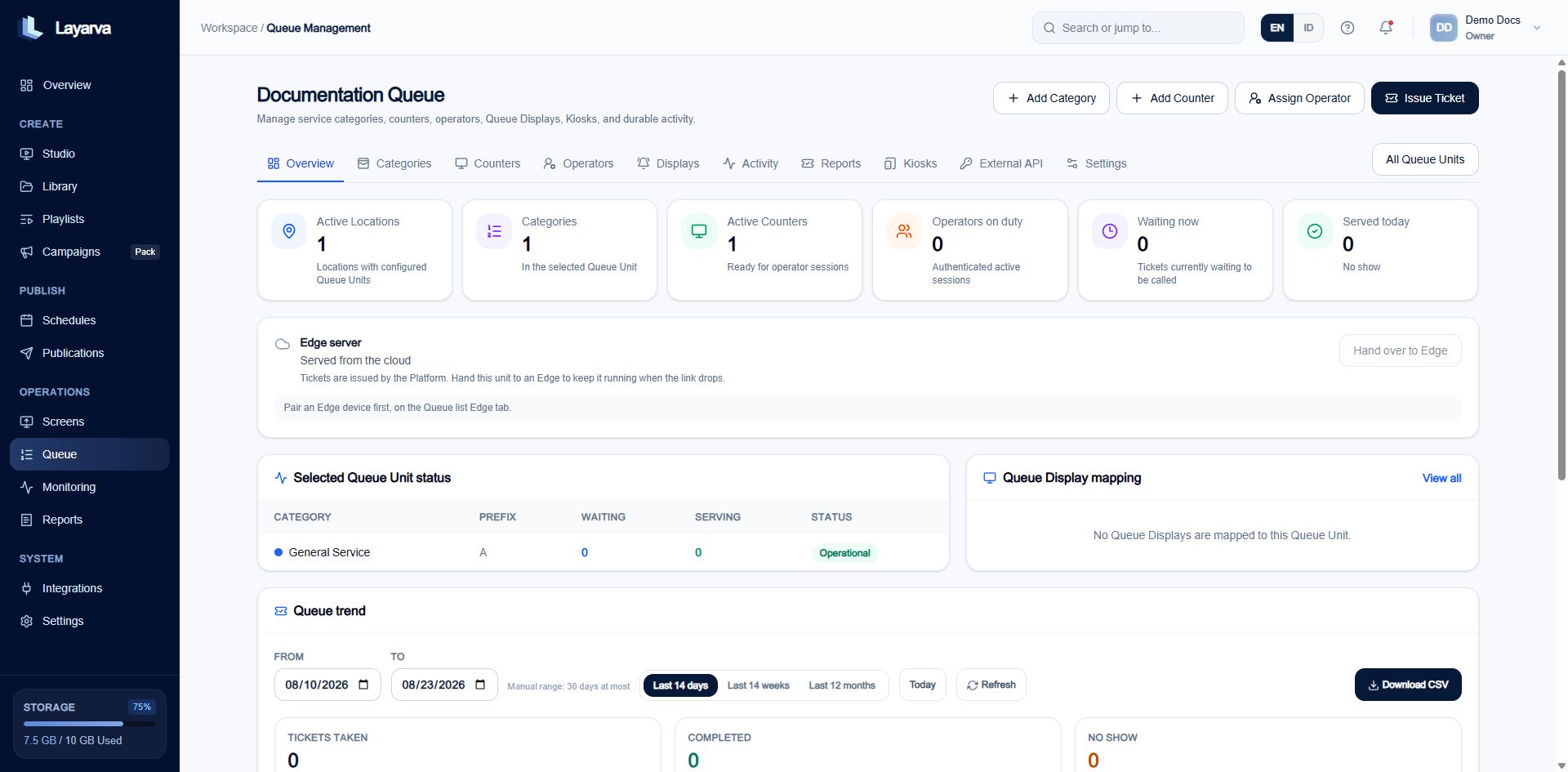 ## Queue anatomy
| Component | Responsibility |
| ----------------- | ---------------------------------------------------------------------------------------------------------- |
| **Category** | A service customers can select. It defines the ticket prefix, such as `A` for General Service. |
| **Counter** | A service destination such as Counter 1, Cashier 2, or Room 3. A Counter can serve one or more Categories. |
| **Operator** | A workspace member assigned to a Counter who calls and processes tickets. |
| **Kiosk** | The customer-facing station that issues tickets and can send them to a thermal printer. |
| **Display** | A Screen bound to the Queue Channel that shows calls. One Display can be the audio master. |
| **Queue Channel** | The dedicated playback target for the Queue Design and its one-item Queue Playlist. |
Each Queue Design belongs to one Queue Unit. Its Queue Playlist contains exactly that one Design and the Queue Channel remains inside the same Queue Unit chain.
## How a ticket moves
1. A customer selects a Category on a Kiosk or a ticket is issued through the dashboard or API.
2. Layarva assigns the next number using the Category prefix and Queue Unit numbering rules.
3. The ticket enters **Waiting**.
4. An Operator at a compatible Counter calls the next ticket.
5. The audio-master Display plays the chime and announcement while every bound Display updates visually.
6. The Operator starts service and completes it, or marks the customer as no-show.
7. Durable activity and reports retain the outcome.
## Queue Management tabs
| Tab | What it manages |
| ---------------- | ----------------------------------------------------------------------------------------------------- |
| **Overview** | Readiness, live waiting totals, active Counters, Operators, Display mapping, and recent activity. |
| **Categories** | Service name, code, prefix, color, and operational status. |
| **Counters** | Customer-facing destination labels, internal numbers, service Categories, and current ticket. |
| **Operators** | Workspace membership, Counter assignments, on-duty state, and available services. |
| **Displays** | Screen binding, Cloud or Edge delivery, playback, audio role, language, chime, voice, and unlock PIN. |
| **Activity** | Durable ticket and runtime event timeline. |
| **Reports** | Queue totals, service success, duration, and breakdowns by Operator, Category, and Counter. |
| **Kiosks** | Trusted customer-facing stations, Kiosk Templates, pairing, activation, and browser printing. |
| **External API** | Queue credentials, API workflow, and webhook configuration. |
| **Settings** | Numbering, no-show policy, Kiosk appearance, and ticket print templates. |
## Cloud Queue and Edge Queue
The Queue Unit remains managed in the Platform in both cases:
* With **Cloud**, Kiosks, Operators, and Displays exchange live state with Layarva directly.
* With **Edge**, the branch Edge receives a temporary authority lease, local configuration, and number blocks. It can keep local Queue operations running during a WAN outage and reconciles when connectivity returns.
Queue live content is **Internet Required** for an ordinary offline package. Use Cloud or Edge for a working Queue; do not treat a signed Offline content package as a live Queue runtime.
## Related guides
* [Configure a Queue Unit](/queue/configuration)
* [Design and Print Queue Tickets](/queue/ticket-printing)
* [Cloud, Edge, and Offline Delivery](/screens/delivery-modes)
## Queue anatomy
| Component | Responsibility |
| ----------------- | ---------------------------------------------------------------------------------------------------------- |
| **Category** | A service customers can select. It defines the ticket prefix, such as `A` for General Service. |
| **Counter** | A service destination such as Counter 1, Cashier 2, or Room 3. A Counter can serve one or more Categories. |
| **Operator** | A workspace member assigned to a Counter who calls and processes tickets. |
| **Kiosk** | The customer-facing station that issues tickets and can send them to a thermal printer. |
| **Display** | A Screen bound to the Queue Channel that shows calls. One Display can be the audio master. |
| **Queue Channel** | The dedicated playback target for the Queue Design and its one-item Queue Playlist. |
Each Queue Design belongs to one Queue Unit. Its Queue Playlist contains exactly that one Design and the Queue Channel remains inside the same Queue Unit chain.
## How a ticket moves
1. A customer selects a Category on a Kiosk or a ticket is issued through the dashboard or API.
2. Layarva assigns the next number using the Category prefix and Queue Unit numbering rules.
3. The ticket enters **Waiting**.
4. An Operator at a compatible Counter calls the next ticket.
5. The audio-master Display plays the chime and announcement while every bound Display updates visually.
6. The Operator starts service and completes it, or marks the customer as no-show.
7. Durable activity and reports retain the outcome.
## Queue Management tabs
| Tab | What it manages |
| ---------------- | ----------------------------------------------------------------------------------------------------- |
| **Overview** | Readiness, live waiting totals, active Counters, Operators, Display mapping, and recent activity. |
| **Categories** | Service name, code, prefix, color, and operational status. |
| **Counters** | Customer-facing destination labels, internal numbers, service Categories, and current ticket. |
| **Operators** | Workspace membership, Counter assignments, on-duty state, and available services. |
| **Displays** | Screen binding, Cloud or Edge delivery, playback, audio role, language, chime, voice, and unlock PIN. |
| **Activity** | Durable ticket and runtime event timeline. |
| **Reports** | Queue totals, service success, duration, and breakdowns by Operator, Category, and Counter. |
| **Kiosks** | Trusted customer-facing stations, Kiosk Templates, pairing, activation, and browser printing. |
| **External API** | Queue credentials, API workflow, and webhook configuration. |
| **Settings** | Numbering, no-show policy, Kiosk appearance, and ticket print templates. |
## Cloud Queue and Edge Queue
The Queue Unit remains managed in the Platform in both cases:
* With **Cloud**, Kiosks, Operators, and Displays exchange live state with Layarva directly.
* With **Edge**, the branch Edge receives a temporary authority lease, local configuration, and number blocks. It can keep local Queue operations running during a WAN outage and reconciles when connectivity returns.
Queue live content is **Internet Required** for an ordinary offline package. Use Cloud or Edge for a working Queue; do not treat a signed Offline content package as a live Queue runtime.
## Related guides
* [Configure a Queue Unit](/queue/configuration)
* [Design and Print Queue Tickets](/queue/ticket-printing)
* [Cloud, Edge, and Offline Delivery](/screens/delivery-modes)