> ## Documentation Index
> Fetch the complete documentation index at: https://docs.layarva.com/llms.txt
> Use this file to discover all available pages before exploring further.
# Campaigns and Schedules
> Coordinate several timed Channel placements under one Campaign and understand how Campaign differs from a Schedule.
## The short definition
A **Campaign** is not a Player content source. It is a named orchestration and reporting layer that creates one Schedule for every Campaign Placement when the Campaign is launched.
The Channel still determines what its Screens play. During a Placement window, the generated Schedule temporarily overrides the Channel's Default Playlist. Outside that window, the Default Playlist returns.
## Campaign versus Schedule
| | Schedule | Campaign |
| --------------- | ----------------------------------------------------- | ----------------------------------------------------------------------------------------- |
| Primary purpose | Automate one Playlist version on one Channel. | Coordinate several Playlist-version and Channel targets under one objective. |
| Creation | Created directly and individually. | Saved as a Draft containing one or more Placements. |
| Runtime | Executes its own start and end occurrences. | Launch creates ordinary Schedules; those Schedules execute. |
| Target count | One Channel per Schedule. | Several Placements, each targeting one Channel. |
| Reporting | Reported as one scheduling rule and its Publications. | Provides one commercial/reporting identity across all generated Schedules and placements. |
| QR attribution | Not a Campaign identity. | Can use a unique tracking slug for attribution. |
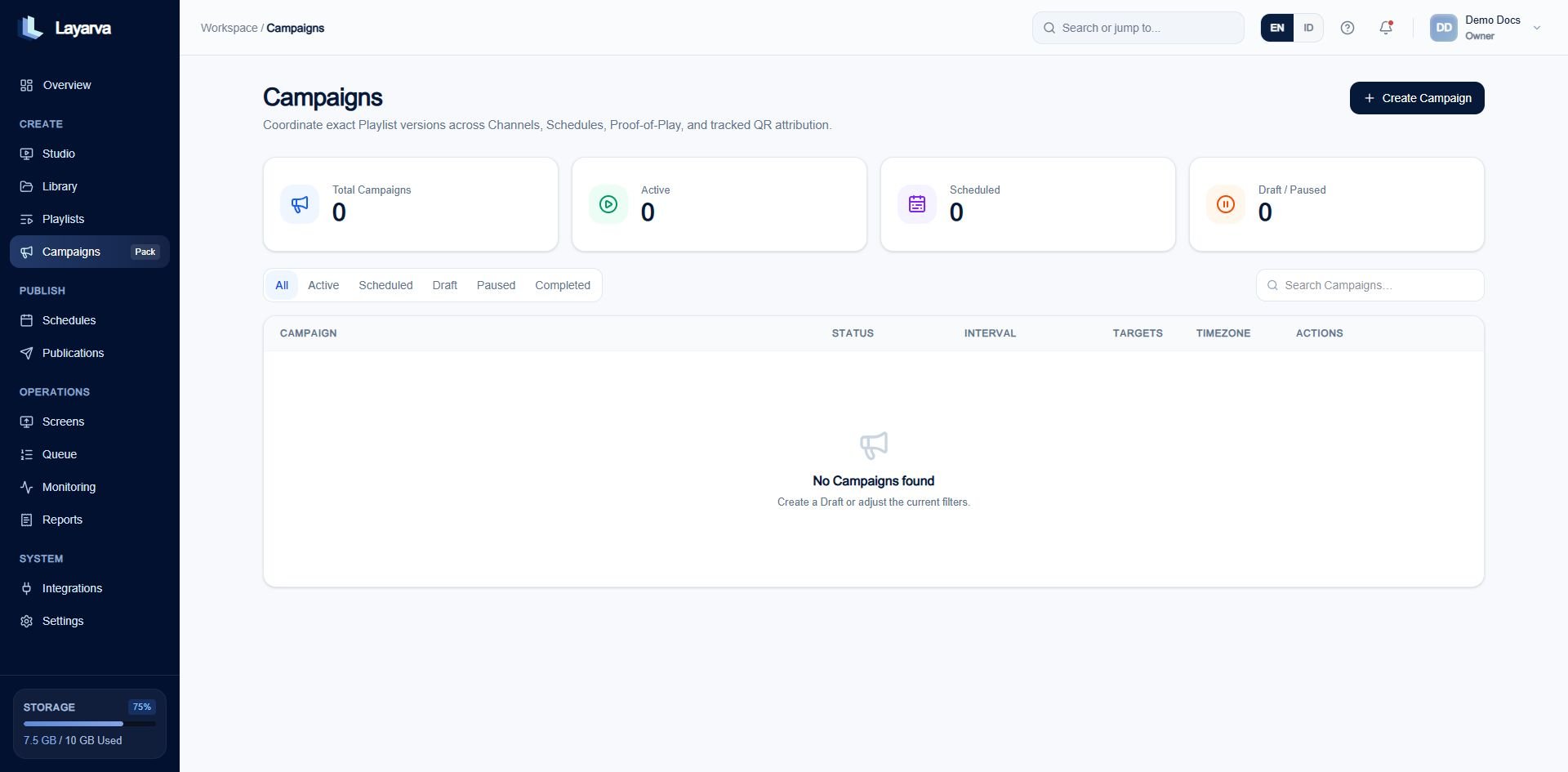 ## Campaign and Placement anatomy
The Campaign defines:
* Name, description, and unique tracking slug.
* Overall start and end.
* Default Campaign timezone.
* Lifecycle state: Draft, Launched, Paused, or Archived.
Each Placement defines:
* A Placement name.
* One exact Ready Playlist version.
* One Channel.
* **Entire Campaign**, **Custom date & time**, or **Weekly recurring** timing.
* An optional timezone override for that target.
## Create a Campaign Draft
1. Open **Campaigns** and select **Create Campaign**.
2. In **Campaign interval**, enter the name, objective, start, end, and timezone.
3. Continue to **Targets & Schedules**.
4. For each target, select the exact Ready Playlist version and Channel.
5. Choose the Placement timing and timezone.
6. Add more targets when the Campaign spans several Channels.
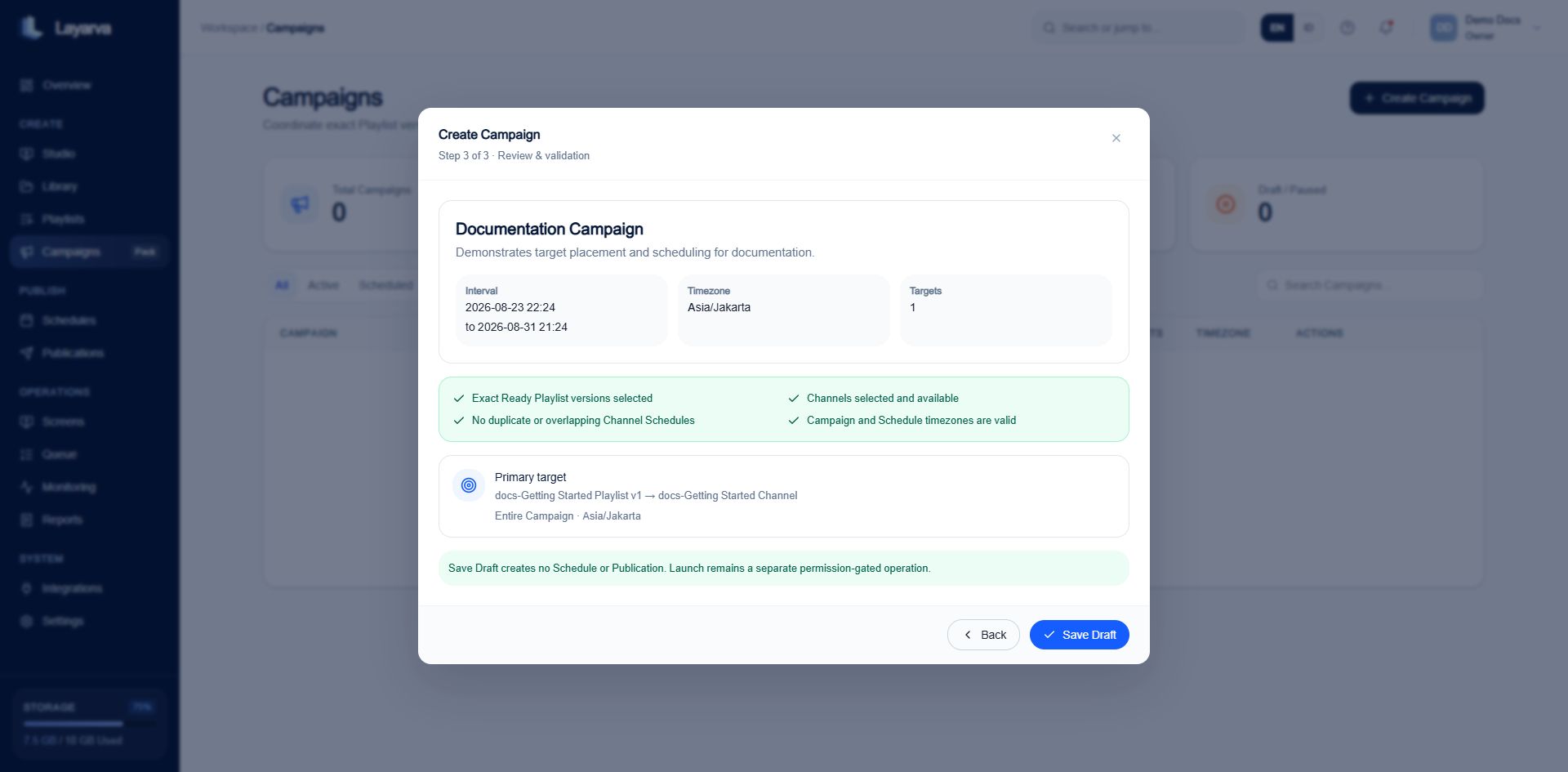
7. Review exact versions, Channel availability, timing overlap, and timezone validation.
8. Select **Save Draft**.
## Campaign and Placement anatomy
The Campaign defines:
* Name, description, and unique tracking slug.
* Overall start and end.
* Default Campaign timezone.
* Lifecycle state: Draft, Launched, Paused, or Archived.
Each Placement defines:
* A Placement name.
* One exact Ready Playlist version.
* One Channel.
* **Entire Campaign**, **Custom date & time**, or **Weekly recurring** timing.
* An optional timezone override for that target.
## Create a Campaign Draft
1. Open **Campaigns** and select **Create Campaign**.
2. In **Campaign interval**, enter the name, objective, start, end, and timezone.
3. Continue to **Targets & Schedules**.
4. For each target, select the exact Ready Playlist version and Channel.
5. Choose the Placement timing and timezone.
6. Add more targets when the Campaign spans several Channels.
7. Review exact versions, Channel availability, timing overlap, and timezone validation.
8. Select **Save Draft**.
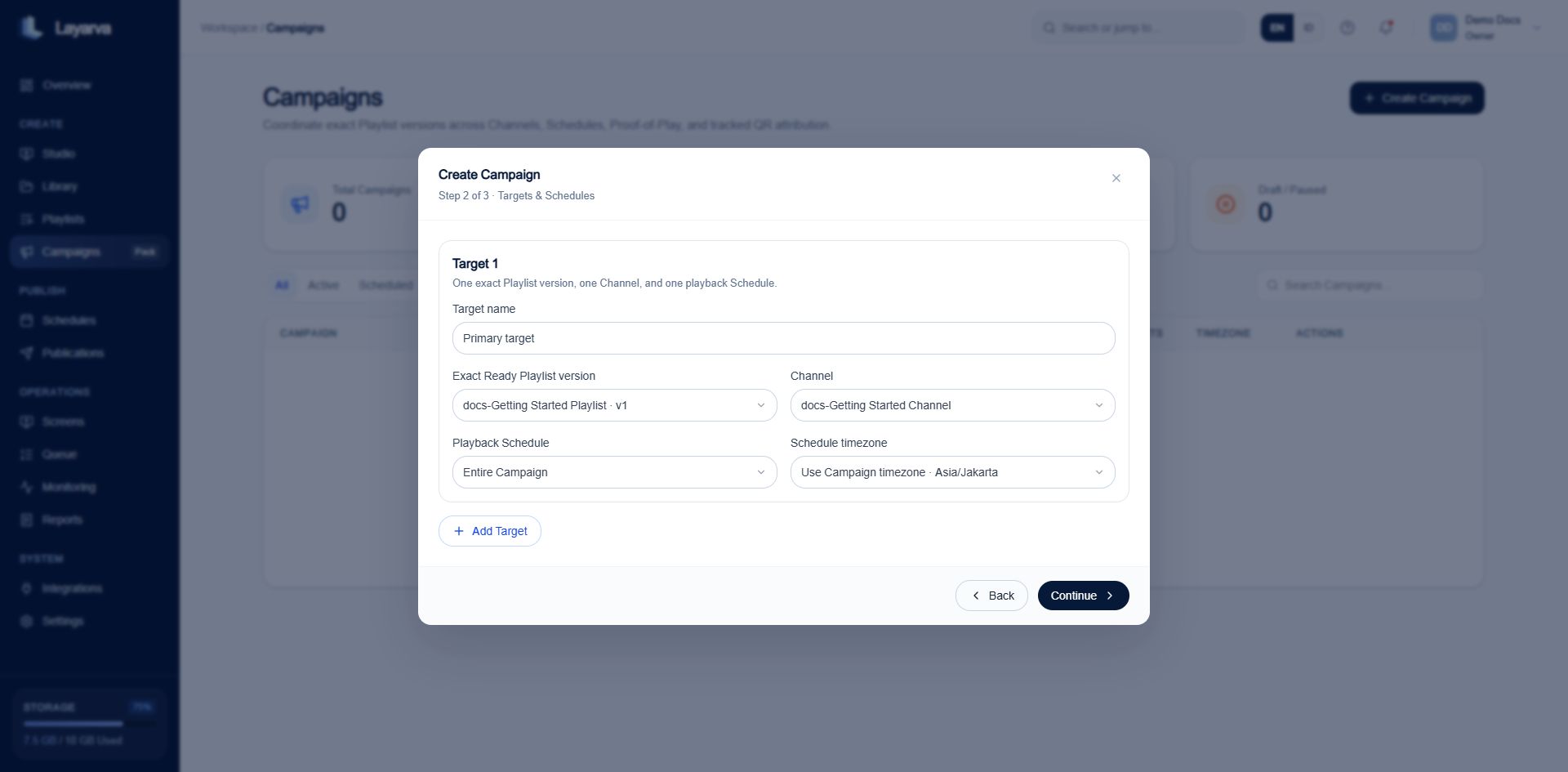 Saving a Draft creates no Schedule or Publication.
 ## Launch and runtime behavior
Launch validates that:
* The Campaign is still Draft.
* Every Placement remains inside the Campaign interval.
* The pinned Playlist version is valid and Ready.
* Each Channel has a Default Playlist.
* A Placement is not scheduling that same Default Playlist.
* No active Schedule overlaps the same Channel and time.
* The Placement window has not already ended.
After validation, Launch atomically creates one active Schedule per Placement and plans its start and end occurrences.
## Pause, resume, and archive
| Action | System behavior | Screen behavior |
| ----------- | --------------------------------------------------------------- | --------------------------------------------------------------------------------------- |
| **Pause** | Disables generated Schedules and cancels pending occurrences. | Each target Channel returns to its Default Playlist on the next Player synchronization. |
| **Resume** | Enables Schedules and replans remaining occurrences. | Campaign content returns during the next valid window. |
| **Archive** | Removes the Campaign from active work while retaining evidence. | No new Campaign playback is scheduled. |
## Example
A `Ramadan Promotion` Campaign can contain:
* `Lobby Morning`: Promotion Playlist v3 on the Lobby Channel, Monday–Saturday from 07:00–11:00.
* `Queue Display`: Queue-safe Promotion Playlist v2 on the waiting-room Channel for the complete Campaign interval.
At 11:00 the Lobby Channel returns to its Default Playlist. The Campaign never directly plays content; its generated Schedule changes the Channel's active Publication for the configured window.
## Related guides
* [Create and Manage Schedules](/publishing/schedules)
* [Understand Publishing](/studio/publishing)
* [Create a Playlist](/studio/playlists)
## Launch and runtime behavior
Launch validates that:
* The Campaign is still Draft.
* Every Placement remains inside the Campaign interval.
* The pinned Playlist version is valid and Ready.
* Each Channel has a Default Playlist.
* A Placement is not scheduling that same Default Playlist.
* No active Schedule overlaps the same Channel and time.
* The Placement window has not already ended.
After validation, Launch atomically creates one active Schedule per Placement and plans its start and end occurrences.
## Pause, resume, and archive
| Action | System behavior | Screen behavior |
| ----------- | --------------------------------------------------------------- | --------------------------------------------------------------------------------------- |
| **Pause** | Disables generated Schedules and cancels pending occurrences. | Each target Channel returns to its Default Playlist on the next Player synchronization. |
| **Resume** | Enables Schedules and replans remaining occurrences. | Campaign content returns during the next valid window. |
| **Archive** | Removes the Campaign from active work while retaining evidence. | No new Campaign playback is scheduled. |
## Example
A `Ramadan Promotion` Campaign can contain:
* `Lobby Morning`: Promotion Playlist v3 on the Lobby Channel, Monday–Saturday from 07:00–11:00.
* `Queue Display`: Queue-safe Promotion Playlist v2 on the waiting-room Channel for the complete Campaign interval.
At 11:00 the Lobby Channel returns to its Default Playlist. The Campaign never directly plays content; its generated Schedule changes the Channel's active Publication for the configured window.
## Related guides
* [Create and Manage Schedules](/publishing/schedules)
* [Understand Publishing](/studio/publishing)
* [Create a Playlist](/studio/playlists)