> ## Documentation Index
> Fetch the complete documentation index at: https://docs.layarva.com/llms.txt
> Use this file to discover all available pages before exploring further.
# Layarva Edge Overview
> Understand how one Edge device serves local Screens and Queue Units during a WAN outage.
## What you'll accomplish
You will understand the two jobs of an Edge device, its network requirements, and what continues when internet access fails.
## What Edge is
Layarva Edge is a Windows or Android branch server. It synchronizes with the Platform and serves approved devices over LAN or Wi-Fi, using port `7749` by default.
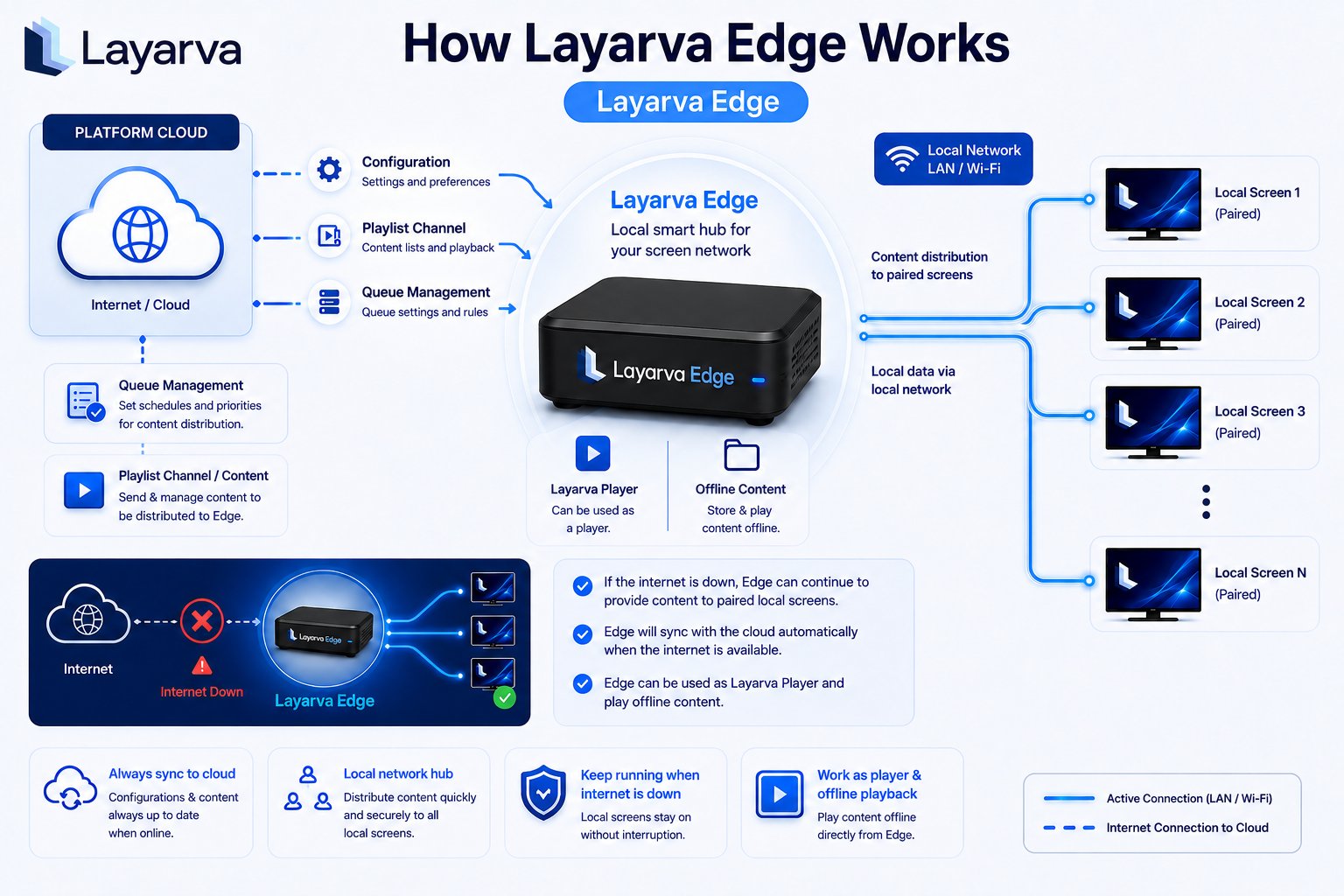 ## One device, two mechanisms
| Mechanism | What Edge controls | Assignment model |
| --------------- | ------------------------------------ | ----------------------------------------------- |
| Screen delivery | Content for individual Screens | Screen is explicitly handed to one active Edge. |
| Queue authority | Ticket issuance and Queue operations | Queue Unit grants a renewable authority lease. |
These mechanisms can use the same physical Edge but must not be confused. Assigning a Screen does not automatically hand over its Queue Unit, and granting Queue authority does not automatically move every Screen.
## Operational timing
| Behavior | Value |
| ------------------------------ | ------------------------ |
| Edge sync interval | 15 seconds |
| Edge presumed unavailable | 120 seconds without sync |
| Default LAN port | 7749 |
| Queue authority lease | 120 seconds |
| Reclaim guard | 60 seconds |
| Queue number block | 100 numbers by default |
| Reconciled operation retention | 30 days |
The Edge clock remains untrusted until the device establishes wall-clock time after boot. A device with an untrusted clock cannot safely issue numbers for the correct business day.
## During an outage
* Cached signage keeps playing on Screens assigned to that Edge.
* Local Queue Kiosks can issue tickets from allocated number blocks.
* Operators can use branch-only Edge PINs when cloud sign-in is unavailable.
* Queue operations are reconciled with the Platform when connectivity returns.
* Cloud webhooks are sent after reconciliation, in Platform order.
## Important limits
* An Edge Screen cannot also use direct Cloud delivery.
* An unpaired or disabled Edge cannot accept a Screen handover.
* Queue live state is not an Offline Package feature; it requires Cloud or Edge runtime.
* Edge entitlement depends on the workspace plan and resolved add-ons.
Premium and Queue Only currently have a verified entitlement-name mismatch in the Queue Edge entitlement path. Confirm the workspace's resolved entitlement with support before deployment.
## Related guides
* [Add and Pair an Edge](/edge/pairing)
* [Assign Screens to Edge](/edge/screen-assignment)
* [Hand a Queue Unit to Edge](/edge/queue-authority)
* [Cloud, Edge, and Offline Delivery](/screens/delivery-modes)
## One device, two mechanisms
| Mechanism | What Edge controls | Assignment model |
| --------------- | ------------------------------------ | ----------------------------------------------- |
| Screen delivery | Content for individual Screens | Screen is explicitly handed to one active Edge. |
| Queue authority | Ticket issuance and Queue operations | Queue Unit grants a renewable authority lease. |
These mechanisms can use the same physical Edge but must not be confused. Assigning a Screen does not automatically hand over its Queue Unit, and granting Queue authority does not automatically move every Screen.
## Operational timing
| Behavior | Value |
| ------------------------------ | ------------------------ |
| Edge sync interval | 15 seconds |
| Edge presumed unavailable | 120 seconds without sync |
| Default LAN port | 7749 |
| Queue authority lease | 120 seconds |
| Reclaim guard | 60 seconds |
| Queue number block | 100 numbers by default |
| Reconciled operation retention | 30 days |
The Edge clock remains untrusted until the device establishes wall-clock time after boot. A device with an untrusted clock cannot safely issue numbers for the correct business day.
## During an outage
* Cached signage keeps playing on Screens assigned to that Edge.
* Local Queue Kiosks can issue tickets from allocated number blocks.
* Operators can use branch-only Edge PINs when cloud sign-in is unavailable.
* Queue operations are reconciled with the Platform when connectivity returns.
* Cloud webhooks are sent after reconciliation, in Platform order.
## Important limits
* An Edge Screen cannot also use direct Cloud delivery.
* An unpaired or disabled Edge cannot accept a Screen handover.
* Queue live state is not an Offline Package feature; it requires Cloud or Edge runtime.
* Edge entitlement depends on the workspace plan and resolved add-ons.
Premium and Queue Only currently have a verified entitlement-name mismatch in the Queue Edge entitlement path. Confirm the workspace's resolved entitlement with support before deployment.
## Related guides
* [Add and Pair an Edge](/edge/pairing)
* [Assign Screens to Edge](/edge/screen-assignment)
* [Hand a Queue Unit to Edge](/edge/queue-authority)
* [Cloud, Edge, and Offline Delivery](/screens/delivery-modes)